
16x16 dungeon tileset
A 16x16 dungeon tileset is a stone-hall kit on a 16-pixel grid: floors, walls, pits, doors, and the props that make a crypt or vault feel like a place, not a corridor of repeats.
For a top-down RPG or roguelike, the useful pieces are the ones that let you change direction and height: a wall-top that autotiles around a room, a wall face under that top, a chasm or pit, a door, and a few props that read at a small size (a chest, a torch, a banner, a sarcophagus).
What to include
- Floors that tile in every direction. Flagstone, brick, or a worn path, plus a variant or two so a long hall does not look stamped.
- A wall-top autotile. A 16-piece set (one tile for each combination of N, E, S, and W neighbours) is enough to wrap a room. Place a wall-face tile on the south edge so the wall has a front.
- A pit or chasm autotile if the dungeon should drop away, not just stop at a wall.
- Doors, an arch, or a vault. These are the rooms' punctuation.
- Light and hazards. A torch or brazier (animated if you can), spikes, a lever, a chest. Keep each on a transparent background so they sit on the floor layer.
A short how-to
- Import the native 16x16 sheet with nearest-neighbour filtering. The import guide covers Godot, Unity, and Tiled.
- Paint floors, then wall tops, then wall faces along the southern edge of each wall-top run. The sample map in a Harbor Pixels pack shows the pattern.
- Cut pits after the floor is down, so you can see where a bridge or a ledge should sit.
- Place doors and props on a layer above the ground. Split tall pieces (
_top/_bot) so the top cell sits one tile north. - If your game's native tile is 32, 48, or 64 pixels, use the matching upscale folder — those sheets are scaled from the 16x16 originals, not redrawn. See the 32x32 tileset hub.
Where to get one from Harbor Pixels
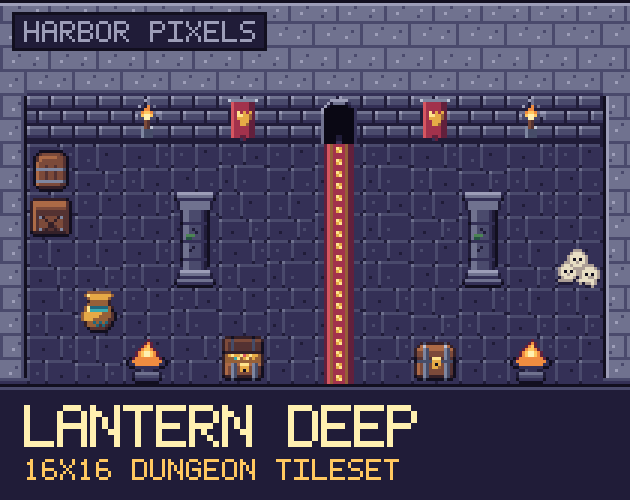
Lantern Deep is a 16x16 dungeon tileset: 107 named cells, a 16-piece wall-top autotile, a 16-piece chasm autotile, a crypt, traps, treasure, and four animations (torch, brazier, dripping puddle, crystal). It includes 32, 48, and 64 px upscales. Store links are coming soon.
There is not a free dungeon slice yet. To practise the import steps on a free 16x16 sheet, use the free dockside tileset, diner props, or winter sampler. Those packs use the same grid, filtering, and upscale folders.
For how the camera is set up across the catalog, see top-down tilesets.
Made with AI assistance.